quietest
Quietest 🤫
A Chrome extension that hides test files on GitHub pull requests, so you can review the real code. The quietest diff: tests muted until you ask.
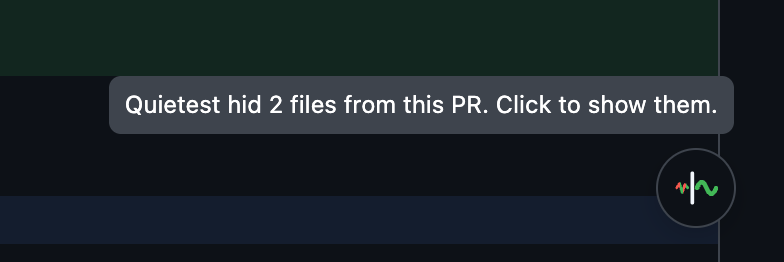
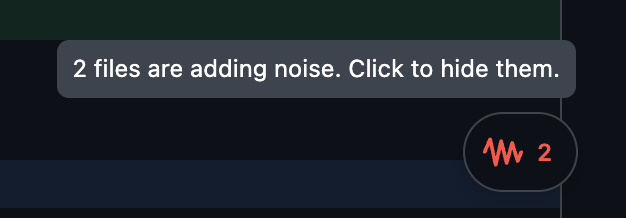
| Tests hidden (default) | Tests shown |
|---|---|
 |
 |
Motivation 🤔
Since AI coding tools, pull requests got big. Much of each diff is tests, mocks, fixtures, and snapshots, and that noise buries the code you actually need to review. Quietest hides it, so you can review in peace.
It uses the same filter as T3 Code’s “Hide test files” (classifyChangedFile in packages/shared/src/changedFileKind.ts): files classified as tests or mocks are hidden. The filter might be changed later, but right now it’s same as T3 Code’s. One difference: generated files (lockfiles, *.gen.ts) inside test or fixture folders are hidden too.
Installation 🚀
 and other Chromium browsers
Install from the latest release 📦

- Download
quietest.zipfrom the latest release - Unzip it somewhere you’ll keep it. Chrome loads the extension from this folder every time it starts
- Open Chrome and navigate to
chrome://extensions/ - Enable “Developer mode” by toggling the switch in the top right corner
- Click “Load unpacked” and select the unzipped folder
- Open a PR’s Files changed tab. Test files are now hidden
Features 🌟
- Hides test files, mocks, fixtures, and snapshots in a PR’s diff and in its file tree. Folders that hold only hidden files are hidden too.
- When Quietest hides files on a PR, its button shows at the bottom right of the page. Hover it to see how many files it hid. Click it to show them again; the button then turns into red noise with the count of files. Click again to hide them.
- Every new PR starts with these files hidden.
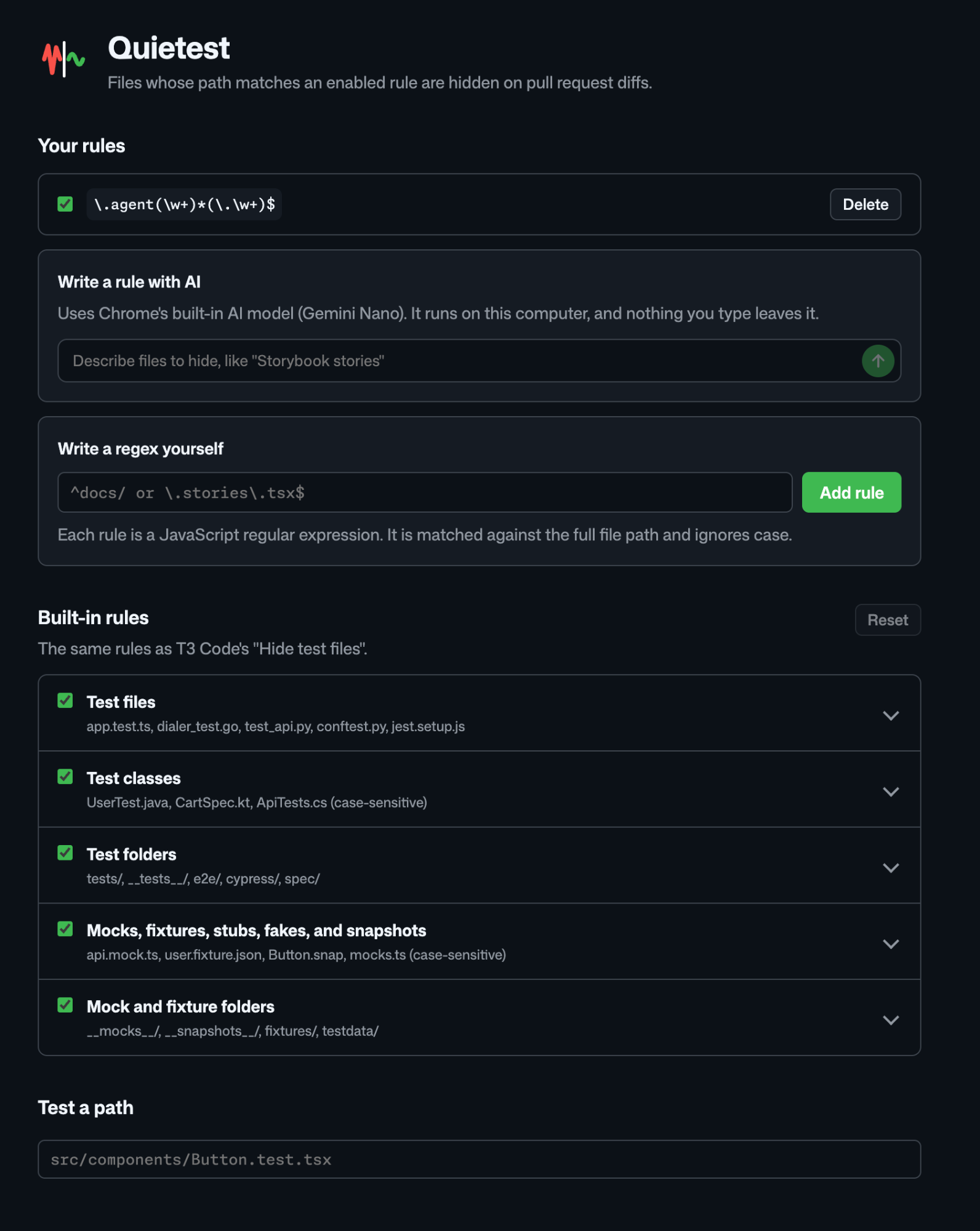
- Choose which paths to hide on the settings page, with your own regex rules or with Chrome’s on-device AI.
Settings ⚙️
Click the Quietest icon in the Chrome toolbar. If you do not see it, pin it from the extensions (puzzle) menu. You can also open Details > Extension options in chrome://extensions.
- Turn each built-in rule on or off.
- Add your own rules. A rule is a JavaScript regex, matched against the full file path, ignoring case. For example,
\.stories\.tsx$or^docs/. A regex that is too slow to run safely on GitHub pages is rejected. - Type a file path in Test a path to see which rule hides it.
- Describe files in plain English, like “database migrations”, in Write a rule with AI and click the arrow. Chrome’s on-device AI (Gemini Nano) writes the regex for you to review. Nothing you type leaves your computer. The first use downloads the model. If your Chrome or computer cannot run it, the page says why and links to Chrome’s requirements.
Settings sync with your Chrome profile, and open PR tabs update at once.
Privacy 🔒
Quietest does not collect or send any data. Your rules stay in your browser. See the privacy policy.
Development 🛠️
- Download or clone this repository to your local machine
- Open Chrome and navigate to
chrome://extensions/ - Enable “Developer mode” by toggling the switch in the top right corner
- Click “Load unpacked” and select the directory containing the extension files
- The extension should now be installed and active
Run the tests with npm test.
Icons
Edit icons/icon.svg, then run ./scripts/build-icons.sh to make all PNGs again. It needs Google Chrome.
icons/16.png,32.png,48.png,128.png: extension icons (128 has the 16 px padding the Chrome Web Store asks for).store/promo-small.png(440x280) andstore/promo-marquee.png(1400x560): Chrome Web Store promo tiles.
| Small promo tile | Marquee |
|---|---|
 |
 |
Releasing
- Bump
versioninmanifest.json - Publish a GitHub release tagged with the same version, like
v0.1.0 - The Publish workflow checks the version, runs the tests, uploads the build to the Chrome Web Store, and attaches
quietest.zipto the release. To retry a failed publish, run the workflow by hand with the tag
The workflow runs in the chrome-web-store environment and needs:
- Variable
CWS_EXTENSION_ID: the extension’s Chrome Web Store ID - Secrets
CWS_CLIENT_ID,CWS_CLIENT_SECRET,CWS_REFRESH_TOKEN: Chrome Web Store API credentials - Secret
CRX_PRIVATE_KEY: signs the package for Verified CRX Uploads
Fonts
The settings page uses GitHub’s Mona Sans and Monaspace Neon, both under the SIL Open Font License. The font files in options/fonts/ are the original, unmodified releases, with their licenses next to them.